Best Seller: Beelink Mini PC, Mini S13 PRO Intel 13th N150
Beelink Mini PC, Mini S13 PRO Intel 13th N150(Up to 3.6GHz), 16GB DDR4 500GB SSD, Computer Support 4K Dual HDMI Display/WiFi6/BT5.2/USB3.2/WOL Home/Office
Buy this product on Amazon
In today's fast-paced world, the need for efficient yet compact computing solutions is more pressing than ever. Whether you're a student, a professional working from home, or simply someone who enjoys streaming 4K content, finding a device that balances performance with a small footprint can be a challenge. This article delves into the Beelink Mini PC S13 Pro, a compelling option for those seeking a streamlined desktop experience without sacrificing essential functionality.
Unboxing and Initial Impressions
The Beelink Mini PC S13 Pro arrives in a compact, square box, a clear indicator of the small form factor within. Upon unboxing, the contents include the Mini PC itself, a user manual, two straps to aid in removal from the packaging, a wall-mounting bracket with screws, a power cord, and one HDMI cable. The thoughtful inclusion of a wall-mounting bracket is a practical touch, allowing for discreet placement behind a monitor or TV.
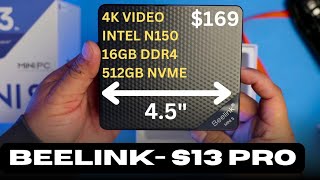
Measuring a mere 4.52 inches by 4 inches by 1.4 inches and weighing only 1.63 pounds, the Beelink Mini PC S13 Pro truly lives up to its "mini" designation. Its diminutive size makes it an ideal candidate for tight workspaces or for those who prefer a clutter-free desk.
Design and Connectivity
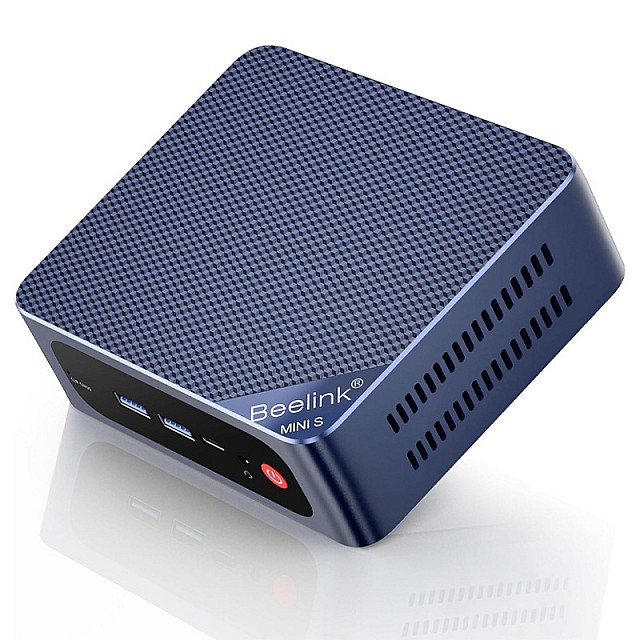
The design of the Beelink Mini PC S13 Pro is both functional and sleek. On the front, you'll find a power button, a 3.5mm audio jack, and two USB-A 3.2 Gen 2 ports, offering impressive data transfer speeds of up to 10 gigabits per second. This high-speed connectivity is a significant advantage for external devices requiring quick data transfer.
The rear of the unit houses additional essential ports: two more USB ports, a 1 Gigabit Ethernet port for reliable wired internet, two 4K 60Hz HDMI ports for dual display setups, and the power port. Ventilation is well-addressed with open vents located on the top, rear, and sides of the unit, ensuring optimal airflow to prevent overheating.
Easy Upgradability
One of the standout features of the Beelink Mini PC S13 Pro is its straightforward upgradability. Opening the unit is a simple process, requiring only a Phillips screwdriver to remove the four screws at the bottom. Once the lid is released by gently pulling on the corner rubbers, you'll discover an available slot for RAM and another for an NVMe SSD. This design makes future upgrades or expansions a breeze, allowing users to easily enhance the system's performance or storage capacity as their needs evolve.
Performance Benchmarks: Boot-Up and Internet Speeds
Getting started with the Beelink Mini PC S13 Pro is as simple as plugging in your peripherals and signing into Windows 11, which comes pre-installed with your purchase. After performing all necessary Windows updates, which took only a few minutes, the system's boot-up speed was impressive. From powering on to reaching the Windows logon screen, the device achieved a remarkable time of approximately 20-21 seconds. Once the password is entered, the system becomes fully operational in less than half a second, ensuring a swift and seamless user experience.
To assess internet performance, speed tests were conducted using both Wi-Fi 6 and a wired Ethernet connection. On Wi-Fi 6, the device achieved download speeds of 878 Mbps and upload speeds of 865 Mbps, closely matching the speeds of a wired connection. Using fast.com, the Mini PC consistently hit the maximum available speeds of 940 Mbps, demonstrating its excellent wireless capabilities. When tested with a wired connection, the device delivered 897 Mbps for download and 890 Mbps for upload. While slightly below the typical 940 Mbps, this minor variance was attributed to peak network usage at the time of testing, underscoring the system's robust networking performance.
Productivity and Multimedia Experience
The Beelink Mini PC S13 Pro is engineered to excel in office productivity tasks. It handles web Browse, Word documents, Excel spreadsheets, and PDFs with remarkable efficiency. During testing, popular web browsers like Chrome loaded quickly, and navigating between multiple websites such as Amazon, Microsoft, and Best Buy was consistently smooth. The system effortlessly managed 10 open tabs without any noticeable slowdowns, providing a fast and fluid Browse experience.
For multimedia consumption, the Beelink Mini PC S13 Pro truly shines. It demonstrated exceptional performance in streaming high-resolution videos on YouTube. Whether testing 1080p, 1440p (the native resolution of an ultrawide screen), or even 4K (2160p) content, videos played without any stuttering or lag. This smooth playback, combined with Bluetooth 5.2 support for wireless headphones, makes the Mini PC an excellent choice for enjoying movies and music.
Gaming Capabilities: A Realistic Look
While the Beelink Mini PC S13 Pro excels in productivity and multimedia, it is important to set realistic expectations regarding its gaming performance. This Mini PC is not designed for modern gaming. Attempts to run graphically intensive games like Fortnite resulted in significant performance issues, and titles requiring advanced features like ray tracing (e.g., Quake II RTX) produced errors due to the absence of a compatible video card. Even less demanding modern games like Counter-Strike 2 experienced severe lag at low resolutions.
However, for those interested in vintage or retro gaming, the Beelink Mini PC S13 Pro may be a viable option, though specific tests for such games were not conducted.
Who is This Mini PC For?
The Beelink Mini PC S13 Pro is an ideal solution for a specific demographic of users. It is perfectly suited for:
- Students: For schoolwork, research, and writing papers.
- Office Professionals: For running Word documents, PDFs, Excel spreadsheets, and web-based business applications.
- Conference Rooms: Its small form factor makes it an excellent choice for Zoom or Teams meetings, easily concealable behind a TV or monitor.
- General Home Use: For seamless web Browse and 4K video streaming.
Its compact size also allows for discreet placement, even next to networking equipment, offering the convenience of remote access without the need for a connected monitor.
Beelink Mini PC S13 Pro at a Glance
Frequently Asked Questions
The Beelink Mini PC S13 Pro stands out as a highly capable and compact computing solution for a wide range of daily tasks. While it won't replace a dedicated gaming rig, its performance for office productivity, web Browse, and high-resolution video playback makes it an excellent choice for home, school, and business environments. Its small form factor, coupled with robust connectivity and easy upgradability, ensures a smooth and efficient user experience. If you are looking for a reliable and space-saving PC that can handle your everyday computing needs with ease, the Beelink Mini PC S13 Pro is a strong contender. If you have any further questions, please feel free to ask in the comments.
Buy this product on Amazon